
Você pode usar a seta para cima ou digitar o início de um comando anterior para pesquisar seu histórico de comandos no DevTools, but if you don't recall the command and it's far away in your history, você pode usar este método para ver todo o histórico do seu console:
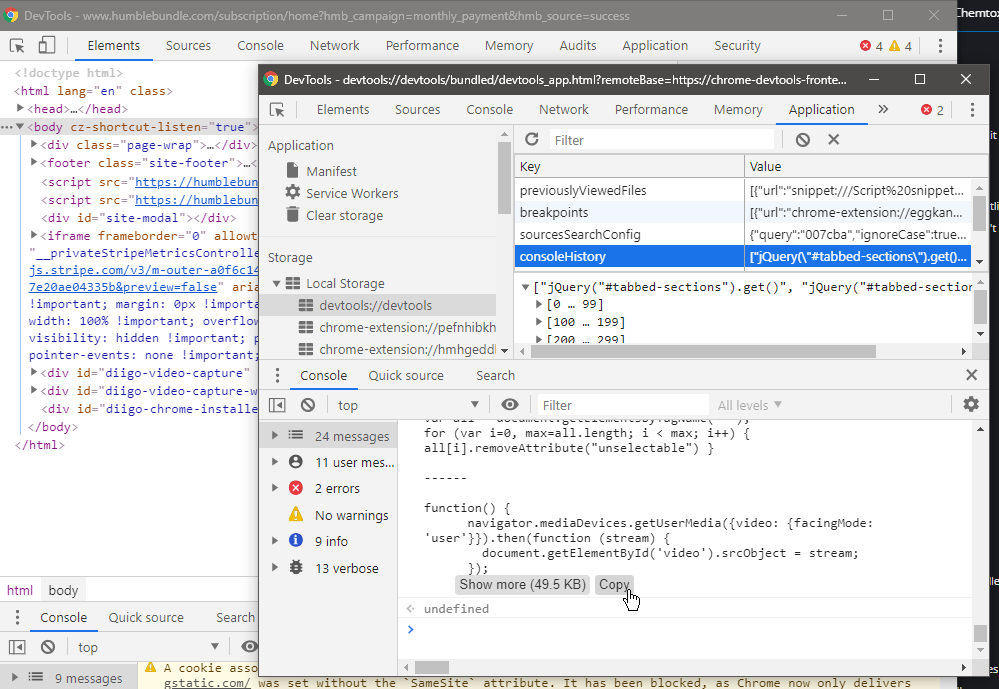
- Enquanto estava no DevTools, Undock into separate window (search for it with Ctrl+Shift+P, or in the menu, the first Dock side icon)
- Ctrl+Shift+J (or "i") to DevTool your DevTools (inceptioooooon)
- Cmd instead of Ctrl for Macheads (hat tip to marsk8er).
- Open the console, and get your history (copy-paste all code to copy your history with a sepatator and open it in a new window):
// Separator to divide commands
separator = '\n\n——————————————————\n\n'
// Convert console-history from JSON to array
cmdHist = JSON.parse(localStorage.getItem('console-history'))
// Format with a nice divider
cmdHistStr = cmdHist.join(separator)
// Copy to clipboard
copy(cmdHistStr)
// Or write to new window
const cmdWin = window.open();
cmdWin.document.body.innerHTML = "<pre>"+ cmdHistStr +"</pre>";
Or a one-line copy:
copy(JSON.parse(localStorage.getItem('console-history')).join('\n\n——————————————————\n\n'))Note: console-history used to be named consoleHistory in Chrome. If you get a null value or error (v.g Uncaught TypeError: Cannot read properties of null (reading 'join')):
- Make sure you're inceptioning DevTools (window title should be DevTools - devtools://devtools/...)
- Try with consoleHistory
- Check its name in the
Application tab -> Local Storage -> devtools://devtools(the image shows the old name)
Bonus tip: você pode Ctrl + Shift + P Limpar histórico do console.
Merci beaucoup 🙂
Haha, this is perfect! But is it possible to increase the history length above 300 records?
‘fraid not, unless you compile your own Chromium: value is hardcoded. I guess someone was a hardcore Sparta groupie!
MacOS instructions:
1. Open up DevTools (Cmd + Option + I)
2. Undock DevTools window (Cmd + Shift + P e procure por “Desencaixar” e selecione “Undock into separate window”
3. Open up DevTools’ Ferramentas de desenvolvimento (Cmd + Option + I)
4. Acompanhe no Passo 3 e além acima
Muito obrigado, Isso é o que venho procurando fazer há muito tempo. Podemos copiar o histórico do console diretamente sem fazer tudo isso ? Como um comando JS chrome.devtool.history ?
Si seulement ! But DevTools internals are isolated for security, so you have to open DevTools on DevTools. However, I added new, simplified instructions, including a one-liner (can you tell me, do you have console-history, or consoleHistory in your browser?)